


NPC Creation App - User Guide
- Jul 27, 2023
- 13 min read
Table of Contents
NPC Gifts - WORK IN PROGRESS
NPC State - WORK IN PROGRESS
Talking to the NPC - WORK IN PROGRESS
Giving Gifts to the NPC - WORK IN PROGRESS
Hurting the NPC - WORK IN PROGRESS
Hobbies with the NPC - WORK IN PROGRESS
NPC Idle Subbehaviors - WORK IN PROGRESS
Creating an NPC - WORK IN PROGRESS
File Input Parsing - WORK IN PROGRESS
Animation Controller - WORK IN PROGRESS
Project Overview
This project is designed as a tool to allow the easy and customizable creation of unique NPCs within Unreal Engine 5. It was fully designed, programmed, and documented by myself.
Within the system, NPCs are made out of several different traits, called blocks, that can be tailor-made or reused between NPCs. There are four of these distinct blocks, discussed in more detail within the NPC blocks section below.
In addition to these blocks, every NPC has the same variables, which are discussed in more detail under the NPC variables section, which can change and interact at different rates based on these blocks. The player, the NPC's environment, and randomness are all able to adjust the NPCs variable values.
These variables are used to demonstrate how the NPC is doing moment to moment, while the blocks are instead representative of how the NPC tends to behave and what they like and dislike generally.
The player, as a result, can interact in four key ways with NPCs. They can hurt the NPC, give them gifts, talk to them, and perform hobbies with them to adjust their relationship and the NPC's state in different, distinct ways.
Together, all of these features can work together to allow user-defined, complex NPCs which can interact with the player and each other in unique ways, via an easy to use and adjust system.
NPC Blocks
Each NPC can be broken into four different blocks of modular, customizable data. The intent behind these blocks is that they work together to a degree, while being capable of being fully separated from each other. That is, NPCs with the same personality applied, but different hobbies, careers, and gifts are still very distinct NPCs. These blocks can be unique for each NPC, or can be reused across several if preferred. This depends solely on project needs.

NPC Personality
Personality specifies values relating to how a villager behaves in a general sense. It can be tailored to customize their dialogue, common negative and positive emotions, their rate of energy degrade, their rate of mood improvement and more. While the personality specific variables can differ tremendously in what exactly they accomplish, they all have a commonality in that their intent is to demonstrate how the NPC reacts and acts towards the player, their environment, and other NPCs.

A huge part of each NPC personality is the associated dialogue bank component it contains. This dialogue bank provides a user-specified collection of responses that they can give to the player under different circumstances. It can be as large or small as desired, but this bank is common to all villagers of that personality type.
There are several other personality variables that may be customized as well, listed below:
Mood - The mood that the NPC starts with.
PositivePreference - The positive mood that the NPC will most commonly choose when a random positive mood is selected.
NegativePreference - The negative mood that the NPC will most commonly choose when a random negative mood is selected.
PositiveMoodPercent - The percent of the time that the NPC will choose the PositivePreference mood when a random positive mood is selected.
NegativeMoodPercent - The percent of the time that the NPC will choose the NegativePreference mood when a random negative mood is selected.
MoodGain - The amount of adjustment a positive mood will receive when a positive mood value is altered.
MoodDrain - The amount of adjustment a negative mood will receive when a negative mood value is altered.
Happiness - The starting happiness value of the NPC, showing how happy they are.
Anger - The starting anger value of the NPC, showing how angry they are.
Fear - The starting fear value of the NPC, showing how scared they are.
Sadness - The starting sadness value of the NPC, showing how sad they are.
Excitement - The starting excitement value of the NPC, showing how excited they are.
Energy - The starting energy level of the NPC.
Energy Levels - This array has two values, the value at index 0 specifying the low energy mark, and the value at index 1 specifying the high energy mark. Anything between is considered mid energy.
Relax Energy Gain - The rate at which the NPC gains energy while in a relaxing state.
Unconscious Energy Gain - The rate at which the NPC gains energy while in an unconscious state.
SleepEnergyGain - The rate at which the NPC gains energy while sleeping.
JobEnergyDrain - The rate at which the NPC loses energy while at work.
HobbyEnergyDrain - The rate at which the NPC loses energy while performing a hobby.
NegativeMoodEnergyDrain - The rate at which the NPC loses energy while they are in a negative mood.
BaseEnergyDrain - The rate at which the NPC loses energy when none of the above energy rates are active.
PlayerAffinity - How much the NPC likes the player (0-100) on program start.
AffinityLevels - This array has two values, the value at index 0 specifying the low affinity mark, and the value at index 1 specifying the high affinity mark. Anything between is considered mid affinity.
HurtAffinity - The amount of affinity the NPC will lose if the player hits them or they talk to the player about a coworker the player hurt in the past.
LikedGiftAffinity - The amount of affinity the NPC gains if the player gives them a gift they like.
BaseGiftAffinity - The amount of affinity the NPC gains if the player gives them a gift they are indifferent to.
DislikedGiftAffinity - The amount of affinity that the NPC loses if the player gives them a gift they dislike.
TalkAffinity - The amount of affinity the NPC gains or loses if the player talks to them.
HobbyAffinity - The amount of affinity the NPC gains every minute while the player performs a hobby with them.
MeanderPercent - The percent of the time that the NPC will choose meander from potential idle subbehaviors.
HobbyPercent - The percent of the time that the NPC will choose hobby from potential idle subbehaviors.
ConversePercent - The percent of the time that the NPC will choose converse from potential idle subbehaviors.
PlayerHits - How many times the player has hit the NPC.
ConverseMinExecutions - The fewest number of times the NPC will talk to the player when they choose to converse with them.
ConverseMaxExecutions - The highest number of times the NPC will talk to the player when they choose to converse with them.
ConverseMinTime - The minimum amount of time that the NPC will talk to another when they choose to talk to an NPC.
ConverseMaxTime - The maximum amount of time that the NPC will talk to another when they choose to talk to an NPC.

Creating new personalities can be done simply by creating a child of the parent class BasicVillagerPersonality_BP. Now, each of these variables and the full dialog bank can be customized to fully build up the new personality.

You can create new villagers of certain personality types in editor by customizing personality variables of a specific villager manually, or from creating a new villager as a child of the personality's class, with this class object inheriting the full dialogue and settings for that personality.
Personality can also be specified via file input (outlined under File Input Parsing in more detail) if preferred. Using two files (one for the dialog bank and one for the personality variables), the full personality can be populated with variables automatically when the program begins execution.
NPC Hobbies
Hobbies specify activities that the NPC can take part in within the world.

Performing hobbies degrades energy at a special, configurable rate, as well as boosting positive moods and degrading negative moods in the villager. Hobbies can have unique animations, and can have the times that a villager wishes to perform them configurable. A villager can have new hobbies added by adding a link to the hobby actor you wish to add to their "hobbies" array.
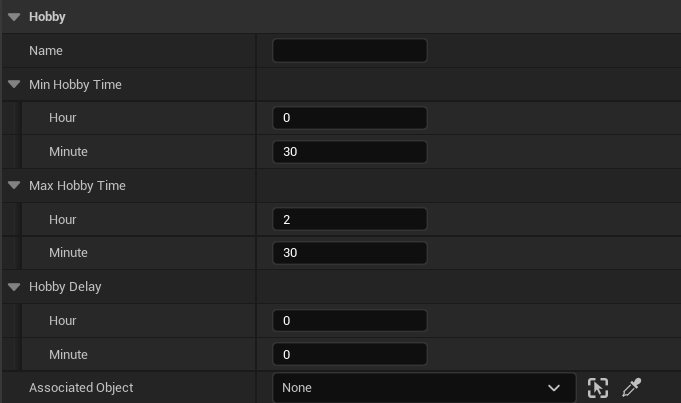
Hobbies can be created by creating a child class from the BaseHobby blueprint class, and then tailoring its name and time specific variables to suit the hobby's needs. If an animation accompanies it, this animation must be ported to NPC skeletons that use it, and a new sub-state of hobby must be created in the base NPC animation blueprint. This is discussed in more detail under the Animation Controller section. Every hobby has configurable variables to specify behavior, shown below.
Name - A name used to specify what the hobby is. This allows proper animation selection within the Animation Blueprint object.
MinHobbyTime - This is the shortest amount of time that the NPC can choose to perform the hobby.
MaxHobbyTime - This is the longest amount of time that the NPC can choose to perform the hobby.
HobbyDelay - This is the amount of time that the NPC needs to wait after indulging the hobby to invoke it again.
AssociatedObject - This is the HobbyStation object, where they need to navigate to invoke the hobby.
Hobbies use a HobbyStation object, which is a location that they need to go to perform the target hobby. This object is derived from the HobbyStation_BP class, and the static mesh can be customized to suit the hobby in question.
In order to add a hobby to the world, simply drag the HobbyStation_BP object into the world, as well as the hobby you wish to add. Then, adjust the associated object parameter under the hobby object to reference that hobby station. The hobby is now set up and ready to use within the world!

To add hobbies to NPCs, you simply need to add the hobby object to the NPC's hobby array.

Another option is to avoid this link setup by tagging the hobby object to identify it, and then adding these tags as strings under the NPC's HobbyTags string array. If this method is used, you also must check the HobbyByTag boolean to true. Now, when the NPC is dropped in a scene that has hobbies with these tags, they will add the hobby actors automatically on setup.
NPC Career
Careers are blocks in NPC specification, that can control what their working schedule is like on a day-to-day basis.

Jobs are activated for an NPC at certain times on certain days, both of which are configurable fields. During this time, the villager is busy, and will be at work at their specified workstation for the duration. They may not do hobbies, will not want to talk with the player, and cannot relax or meander during this period. Their energy will also degrade at a rate configurable in the NPC's personality block. If they are not at work for a minute where they are meant to be working (whether talking, on the way to work, or passed out), this will be considered a minute in overtime that they need to make up later, incrementing the time that they can end work by one.


Jobs have their own associated dialog bank that the NPC can draw responses from, as well as several customizable variables. These variables are listed and discussed below.
JobTitle - The name of the job, used to identify coworkers they can speak about.
Days - An array containing days that the NPC must work.
StartTime - The time that the NPC needs to begin work.
EndTime - The time that the NPC needs to end work.
CommuteTime - The time that the NPC will start walking to their workspace.
WakeTime - The time that the NPC wakes up for the day after sleeping.
SleepTime - The time that the NPC goes to sleep at the end of their day.
NPC Gifts
This section is a work in progress, please check back soon!
NPC Variables
NPCs have certain variables that dictate the actions they are able to and wish to perform. These variables can change frequently and rapidly, as a result of luck, the player, or the environment and how they interact with it. Each of these variables can influence the NPC in a different way, and a full picture of their status relies on knowing each. Each of these variables contributes to a fuzzy logic system, where an NPC can respond in a variety of different ways under the same exact circumstances.

NPC Mood
Mood represents how the NPC feels emotionally. They have separate variables for how sad, angry, happy, excited, and scared they are, with the largest variable being their current mood.
Negative moods are increased by the player hurting them, the player talking to them while they are in a bad mood, working overtime, and receiving disliked gifts. When in a negative mood, NPCs will lose energy at a special, Negative Mood Energy Drain rate. They will increase positive moods when talking to a player about their mood while it is positive, when they are resting (unconsious, asleep, or relaxed physical states), when they are performing a hobby, and when they receive a gift they do not dislike from the player.
Additionally, there is a random mood adjustment system built into the time manager object. Under this system, you can specify a morning, evening, and afternoon time that a random adjustment will occur. When this occurs, two random moods will be boosted, and two will be decremented. This is used to simulate how the villager may feel about the day so far based on factors outside of the player's control.
Mood - The mood that the NPC starts with.
PositivePreference - The positive mood that the NPC will most commonly choose when a random positive mood is selected.
NegativePreference - The negative mood that the NPC will most commonly choose when a random negative mood is selected.
PositiveMoodPercent - The percent of the time that the NPC will choose the PositivePreference mood when a random positive mood is selected.
NegativeMoodPercent - The percent of the time that the NPC will choose the NegativePreference mood when a random negative mood is selected.
MoodGain - The amount of adjustment a positive mood will receive when a positive mood value is altered.
MoodDrain - The amount of adjustment a negative mood will receive when a negative mood value is altered.
Happiness - The starting happiness value of the NPC, showing how happy they are.
Anger - The starting anger value of the NPC, showing how angry they are.
Fear - The starting fear value of the NPC, showing how scared they are.
Sadness - The starting sadness value of the NPC, showing how sad they are.
Excitement - The starting excitement value of the NPC, showing how excited they are.
NPC Energy
NPC energy dictates what the NPC wishes (or is able) to do in the world.
It can cause them to relax when off work if it drops to a low value, or faint while at work if critically low. NPCs can have special dialogue options for the player based on their energy level. Additionally, NPCs do not enjoy player conversation when energy is low, lowering player affinity if approached.
NPCs consistently lose energy within the world when not relaxing, and consistently gain it when relaxing. The rates at which these gains and drains occur are configurable via public variables, and included as part of the Personality block. Rates can differ based on the physical state and mood values of the NPC.
Energy - The current energy level of the NPC.
Energy Levels - This array has two values, the value at index 0 specifying the low energy mark, and the value at index 1 specifying the high energy mark. Anything between is considered mid energy.
Relax Energy Gain - The rate at which the NPC gains energy while in a relaxing state.
Unconscious Energy Gain - The rate at which the NPC gains energy while in an unconscious state.
SleepEnergyGain - The rate at which the NPC gains energy while sleeping.
JobEnergyDrain - The rate at which the NPC loses energy while at work.
HobbyEnergyDrain - The rate at which the NPC loses energy while performing a hobby.
NegativeMoodEnergyDrain - The rate at which the NPC loses energy while they are in a negative mood.
BaseEnergyDrain - The rate at which the NPC loses energy when none of the above rates are active.
NPC Player Affinity
Player affinity is a floating point value from 0-100 indicating how the NPC feels towards the player, with higher values being more positive. The player is, as a result, the only element that may influence this value on an NPC.
They will gain affinity when talking to the player if their mood is not negative, they are not tired, they are not talking about their affinity level with a player they have low affinity with, and are not at work. They also gain player affinity when receiving gifts they don't dislike from the player and when the player performs hobbies with them. Affinity rates are configurable as part of the Personality block.
They will lose player affinity when talking to the player if their mood is negative, they are tired, they are at work, or they are talking about player affinity when their affinity is at a low value. They also lose affinity when being hit by the player, when receiving gifts that they dislike from the player, or when talking to the player about a coworker the player hurt in the past.
PlayerAffinity - How much the NPC likes the player (0-100) on program start.
AffinityLevels - This array has two values, the value at index 0 specifying the low affinity mark, and the value at index 1 specifying the high affinity mark. Anything between is considered mid affinity.
HurtAffinity - The amount of affinity the NPC will lose if the player hits them or they talk to the player about a coworker the player hurt in the past.
LikedGiftAffinity - The amount of affinity the NPC gains if the player gives them a gift they like.
BaseGiftAffinity - The amount of affinity the NPC gains if the player gives them a gift they are indifferent to.
DislikedGiftAffinity - The amount of affinity that the NPC loses if the player gives them a gift they dislike.
TalkAffinity - The amount of affinity the NPC gains or loses if the player talks to them.
HobbyAffinity - The amount of affinity the NPC gains every minute while the player performs a hobby with them.
NPC State
This section is a work in progress, please check back soon!
Player Interactions
Players have four different ways of interacting with NPCs. These interactions will all adjust different variables on the NPC and can lead to them choosing to invoke different actions over time.
The main three methods of interaction (talking to an NPC, giving gifts to an NPC, and hurting an NPC) are available from an Interaction Menu, which is added onscreen when the player clicks on the NPC.
The last method of interaction is performing hobbies with them, and can be invoked by pressing a configurable button while the player is standing on a hobby space that a villager is currently invoking a hobby on.
Each of these methods of interaction is discussed in more detail in their sections below.
Talking to the NPC
This section is a work in progress, please check back soon!
Giving Gifts to the NPC
This section is a work in progress, please check back soon!
Hurting the NPC
This section is a work in progress, please check back soon!
Hobbies with the NPC
This section is a work in progress, please check back soon!
NPC Idle Subbehaviors
This section is a work in progress, please check back soon!
Creating an NPC
This section is a work in progress, please check back soon!
File Input Parsing
This section is a work in progress, please check back soon!
Animation Controller
Each state has a single animation associated with it, besides hobby which has several. Each new NPC can have an animation blueprint setup by making a new child of the NPCController_ABP class, as this will give it the same state machine used by all other NPCs. Each animation does need to be overriden by one that is compatible with the new NPC's skeleton. This option is available under the Asset Override tab within the ABP viewport.

The animation controller changes the NPC's animation based on their physical state within the world. This is mainly used to relay what they're doing to the player, with no real influence over logic or decision-making.

Because of this setup, to add new hobby animations, it is recommended to do so under the NPCController_ABP class itself, not individual children, so that all NPCs can use it. In the case of hobbies, the NPC can transition into a hobby animation if they are currently in the hobby state and if the hobby that they are invoking has a name that matches a certain expected string. This string may be "swimming" or "jogging", and is used to relay to the animation blueprint which hobby specifically is being performed. The hobby sub-state can be left if the state is no longer hobby. By following these steps, new hobbies can be setup with associated unique animations!
